
Download TeeAI – AI‑Powered T‑Shirt Design Tool, Free & Secure
Overview
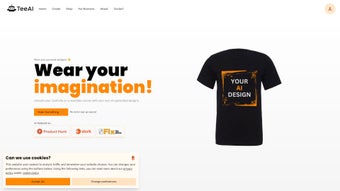
TeeAI is a cutting‑edge web application that brings the power of artificial intelligence to the world of custom apparel. Whether you are a graphic designer looking for fresh inspiration, an entrepreneur launching a merch line, or simply someone who loves to wear unique shirts, TeeAI removes the technical barriers that traditionally accompany design work. The platform operates entirely in the browser, meaning you can start creating without the need for bulky software installations, sign‑ups, or payment details.
Its clean, intuitive interface invites users of any skill level to experiment with color palettes, typography, and patterns, while an advanced AI engine—trained on millions of images and fashion trends—generates high‑resolution design concepts in seconds.
The catalog is organized into logical categories such as T‑shirts, hoodies, and sweatshirts, each populated with AI‑generated templates that can be further customized or used as a starting point for a completely original artwork. Because the service is web‑based, it runs on any modern operating system, be it Windows, macOS, Linux, Android, or iOS, as long as a compatible browser is present.
Privacy is taken seriously: the only cookies used are those necessary for session handling and delivering personalized advertisements, as outlined in the transparent privacy policy. In short, TeeAI combines creativity, convenience, and security into a single free tool that empowers anyone to design professional‑grade apparel without a steep learning curve.
Beyond the core design capabilities, TeeAI offers seamless integration with popular print‑on‑demand services, allowing users to push designs directly to platforms like Printful or Teespring.
This end‑to‑end workflow shortens the time from concept to marketplace, which is especially valuable for small businesses that need to react quickly to trends. The platform also supports exporting design assets in vector format (SVG), ensuring that the artwork remains crisp and scalable for any size garment. With regular updates that introduce new style libraries, AI model improvements, and UI refinements, TeeAI remains a future‑proof solution for anyone looking to stay ahead in the fast‑moving world of custom merchandise.
Key Features
TeeAI’s feature set is designed to cater to both casual hobbyists and serious entrepreneurs. Each capability is built around the central promise of speed, simplicity, and accessibility, while still offering enough depth for detailed customization. The following list outlines the most impactful functionalities, and each item is explained in enough detail to give readers a clear sense of what they can achieve without diving into technical jargon.
- AI‑Generated Design Suggestions: Instantly receive a variety of design concepts based on keywords, styles, or color preferences, allowing you to explore dozens of creative directions in under a minute.
- Customizable Canvas: Adjust layout, fonts, colors, and graphic elements with drag‑and‑drop simplicity, supported by a robust layer system that mimics professional design software.
- Category‑Based Catalog: Browse pre‑organized collections for shirts, hoodies, and sweatshirts to spark inspiration; each category is regularly refreshed with trend‑driven templates.
- High‑Resolution Export: Download designs in PNG or SVG formats suitable for printing on demand, ensuring that every pixel meets the standards of commercial printers.
- No Account Required: Begin designing immediately without registration, saving time and protecting personal data from unnecessary exposure.
- Cross‑Platform Accessibility: Works on any browser across Windows, macOS, Linux, Android, and iOS devices, providing a consistent experience whether you are at a desk or on the go.
- Secure Cookie Management: Uses only essential cookies for session stability and personalized ad delivery, complying with GDPR and CCPA regulations.
- Free Forever Model: All core features are available at no cost, with optional premium upgrades for advanced AI models, expanded asset libraries, and priority rendering.
Installation & Usage Guide
Getting started with TeeAI is remarkably straightforward because it is a web‑based solution. The following step‑by‑step guide walks you through the entire process—from opening the application in a browser to exporting a print‑ready file—while highlighting best practices that help you avoid common pitfalls and get the most out of the AI engine.
- Open a Supported Browser: Launch Chrome, Firefox, Edge, Safari, or any modern browser that supports HTML5, WebGL, and Canvas APIs. For the best performance, ensure your browser is updated to the latest version.
- Navigate to the TeeAI Website: Enter https://teeai.com in the address bar. The homepage loads in seconds thanks to lightweight scripting and CDN‑delivered assets.
- Select a Product Category: Choose between T‑shirts, hoodies, or sweatshirts from the home screen. Each category displays a grid of AI‑generated thumbnails, each representing a unique style concept.
- Enter Your Design Prompt: Use the text box to describe the style you want (e.g., “retro 80s neon galaxy”). The AI will process the prompt and generate several options within seconds, displaying them as selectable thumbnails.
- Customize the Design: Click on a thumbnail to open the editor. Here you can move elements, change colors, replace fonts, or add new graphics from the built‑in library. The editor also includes a smart‑align feature that automatically snaps elements to a grid for professional layout.
- Preview & Export: Use the “Preview” button to see a mock‑up on a virtual model. Adjust the placement if needed, then click “Download” to save a high‑resolution PNG (300 dpi) or an SVG file for vector‑based printing.
- Print or Upload: Send the file to a print‑on‑demand service, or upload it to your own e‑commerce platform. TeeAI also supports direct export to services like Printful via an API key, streamlining the fulfillment workflow.
- Save Your Project (Optional): If you wish to revisit a design later, click “Export Project” to download a JSON file containing all layer information. You can re‑import this file in a future session to continue editing without starting from scratch.
Compatibility: Because TeeAI runs entirely online, the only system requirement is a stable internet connection and a browser that supports JavaScript and Canvas APIs. It is fully compatible with Windows 10/11, macOS Monterey and later, most modern Linux distributions, as well as mobile browsers on Android 8+ and iOS 13+. No additional plugins or extensions are needed, making the experience seamless across desktop and mobile devices.
Pros, Cons, Frequently Asked Questions & Conclusion
Pros
- Completely free for core features – no hidden fees.
- Instant AI‑driven design generation saves time.
- No sign‑up required, preserving user privacy.
- Cross‑platform support ensures accessibility on any device.
- High‑resolution exports ready for professional printing.
- Direct integration options for popular print‑on‑demand services.
- Regular updates keep the template library fresh and trend‑relevant.
Cons
- Advanced AI models are locked behind a premium tier.
- Limited offline capability – requires internet access.
- Design complexity is constrained by the simplicity of the web editor compared to desktop‑only tools.
- Asset library, while growing, is smaller than some paid competitors.
- Performance can vary on older mobile devices due to WebGL demands.
Frequently Asked Questions
Is TeeAI really free to use?
Yes, the core features—including AI‑generated suggestions, basic editing tools, and high‑resolution downloads—are completely free. Optional premium upgrades provide access to higher‑end AI models, expanded asset libraries, and priority rendering, but they are not required to create and export professional‑grade designs.
Do I need to create an account to save my designs?
No account is required for immediate design creation or export. If you wish to store projects for later editing, you can use the “Export Project” feature to download a JSON file locally, which can be re‑imported in any future session.
Which browsers are supported?
TeeAI works on all modern browsers that support HTML5, Canvas, and WebGL—including Chrome, Firefox, Edge, and Safari on both desktop and mobile platforms. For the best experience, keep your browser updated to the latest stable release.
Can I use the designs for commercial purposes?
Yes, once you download the design file you own the rights to use it commercially, such as for merchandise, marketing materials, or resale. The license granted by TeeAI covers unlimited commercial use of exported assets.
How does TeeAI protect my privacy?
The platform uses only essential cookies for session management and personalized ads. No personal data is stored without explicit consent, and the privacy policy complies with GDPR and CCPA regulations, giving users full control over data collection.
Conclusion & Call to Action
TeeAI has positioned itself as a compelling solution for anyone eager to dive into custom apparel design without the steep learning curve of traditional graphic software. By harnessing AI, it democratizes creativity—turning vague ideas into polished, print‑ready graphics in moments. The absence of mandatory registration, coupled with a generous free tier, makes it especially attractive for hobbyists, small business owners, and educators seeking an accessible design tool. While power users may eventually gravitate toward the premium models for deeper control, the core experience delivers impressive value on its own.
The platform’s cross‑device compatibility means you can brainstorm on a smartphone during a commute, refine the design on a laptop at the office, and export the final file from a tablet at home—all without missing a beat. Frequent updates to the AI model and template library ensure that TeeAI stays relevant as fashion trends evolve, giving you a reliable partner for seasonal collections or one‑off promotional items.
Ready to unleash your imagination? Download TeeAI now and start generating unique T‑shirt designs that stand out from the crowd—securely, instantly, and completely free.
TeeAI impresses with its seamless blend of AI creativity and user‑friendly editing. The platform’s speed, cross‑device compatibility, and zero‑cost entry point make it a top choice for quick design work. While power users might miss some advanced features, the free tier is more than sufficient for most small‑scale projects.
Pros: Free core features, instant AI ideas, no sign‑up required.
Cons: Premium upgrades needed for high‑end AI models, no offline mode.



.png)



